awk 'BEGIN {print "Processing started..."}'AWK: The Structured Data Processor
AWK treats input as structured data organized into records (lines) and fields (columns). AWK processes input line-by-line, automatically splits each line into fields, and performs specific actions on those fields.
It’s best suited for:
Column extraction and manipulation - Pull specific columns from large datasets
Aggregation and calculations - Sum columns, compute averages, count occurrences
Conditional processing - Apply logic based on field values or patterns
Report generation - Format and transform data into structured output
Bioinformatics data processing - Handle FASTA, FASTQ, GFF, VCF, and other tabular formats
AWK Program Structure
An AWK program follows a predictable workflow:
Execute commands in the
BEGINblock (optional - use for initialization)Main loop: Read a line from input, split into fields, execute commands on that line
Repeat step 2 until end of file
Execute commands in the
ENDblock (optional - use for final calculations/reporting)
The BEGIN block
The BEGIN block is optional, but is a good place to initialize variables:
Body Block (Main Processing)
The body block executes on every input line. You can restrict execution with patterns:
awk '{print $1, $3}' file.txt              # Process all lines and print 1st and 3rd fields
awk '/pattern/ {print}' file.txt           # print only lines matching pattern
awk 'NR > 1 {print}' file.txt              # Skip first record (line), prints the rest
END block
The END block is optional and executes at the end of the program.
END {printf "Number of lines read: %.1f\n", NR}
Basic examples
Lets start working with some text. We’ll start by create a small text file using heredoc syntax.
cat << 'EOF' > example_text.txt
1)  Amit    Physics 80
2)  Rahul   Maths   90
3)  Shyam   Biology 87
4)  Kedar   English 85
5)  Hari    History 89
EOF
1. Add a header to the file using printf in the BEGIN block
awk 'BEGIN{printf "ID\tName\tSubject\tgrade\n"} {print}' example_text.txtID Name Subject grade
1) Amit Physics 80
2) Rahul Maths 90
3) Shyam Biology 87
4) Kedar English 85
5) Hari History 89
Key points:
- The entire AWK command is enclosed in single quotes (never use double quotes here)
{print}in the body block prints the entire lineprintfallows formatted output
2. Extract specific columns using field variables
awk '{print $2, $4}' example_text.txtAmit 80
Rahul 90
Shyam 87
Kedar 85
Hari 89
Key points
- AWK automatically splits each line into fields. Access them with
$1,$2,$3, etc., where$0represents the whole line:
3. Perform calculations on numeric fields
awk '{sum += $4; count++}
    END {printf "Average grade: %.1f\n", sum/count}' example_text.txt
Average grade: 86.2
Key points:
There is no need to initialize the sum and count variables. AWK has automatic initialization.
‘++’ is a standard increment operator (but not in Python) that adds 1 to any variable
We use the % in the printf statement to specify variable substitution. The options for variable substitution are:
%s - string substitution
%d - integer substitution
%.2f - float substitution with 2 decimal places
4. Use if/else statements to filter or transform data based on conditions
awk '$4 >= 85 {print $2, "passed"}' example_text.txtRahul passed
Shyam passed
Kedar passed
Hari passedIn the above example, the conditional statement goes before and outside the braces of the body block. This is very AWK idiomatic. Alternatively, we can create the same logic by using an if-statement inside the braces:
awk '{if ($4 >= 85) print $2, "passed"}' example_text.txtRahul passed
Shyam passed
Kedar passed
Hari passed
5: Pattern Matching and Regular Expressions
awk '/Math/ {print}' example_text.txt2) Rahul Maths 90
By using, /PATTERN/ before the body block, AWK will search for this pattern in each line and only execute commands in the body block if a match is found. Here is more complex pattern matching example that uses regular expressions:
awk '$3 ~ /^(Physics|Biology)$/ {print $2}' example_text.txtAmit
Shyam
Key points:
The
~operator tests if a field matches a pattern.$3 ~ /^(Physics|Biology)$/checks if field 3 matches either “Physics” or “Biology”.This example also demonstrates two key regex operators, ^ and $.
^ specifies the start of a line/field. At the start of a pattern match, it indicates that the pattern must be the first text in the line/field.
$ is the same as ^, but for the end of the line/field. When used together – /^PATTERN$/ – this indicates that the entire line/field must match the pattern.
Other key regex operators are described below:
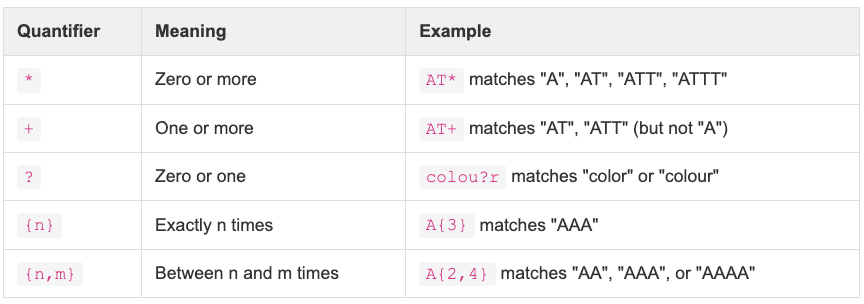
Examples using these operators:
# Find runs of 4 or more A's
awk '/AAAA+/ {print}' sequences.txt

# Matches zero or more T's: "AG", "ATG", "ATTG", "ATTTG"
awk '/AT*G/ {print}' sequences.txt

# Matches at least 1 A and 1T: "ATG", "AATG", "ATTG"
awk '/A+T+G/ {print}' sequences.txt

# Matches "chr" or "chrX" (X is optional)
awk '$1 ~ /^chrX?$/ {print}' chromosomes.txt
Following up on the refex theme, here are some more key pattern matching operators
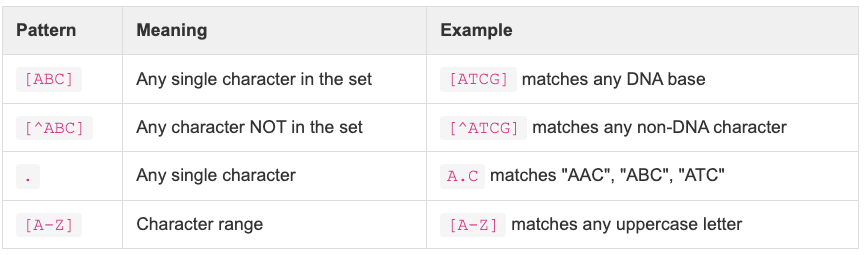
Examples using these operators:
# print lines containing numbers
awk '/[0-9]+/ {print}' data.txt

#Print lines where the first field starts with A, T, C or G.
awk '$1 ~ /^[ATCG]/ {print}' seqs

# Print lines where field 1 contains ONLY valid DNA bases (A, T, C, G)
awk '$1 !~ /[^ATCG]/ {print}' seqs

# Any exactly 3-character codon like "ATG", "TAA", "GGC"
awk '/^[ATCG]{3}$/ {print}' codons.txt

# Print line if the first field matches chromosome names (chr1, chr2, chrX, etc.)
awk '$1 ~ /^chr[0-9XY]+$/ {print}' genes.gff

# Print line if the 9th field includes ID=LOC followed by a number
awk '$9 ~ /ID=LOC[0-9]+/ {print}' genes.gff
Examples relevant to bioinformatics
First let’s create an example fasta file
cat << 'EOF' > sequences.fasta
>seq1
ATCGATCGATCG
>seq2
GCTAGCTAGCTA
>seq3
TTAAGGCCAATT
EOF
6. Now we’ll write an AWK command to calculate the average length of the sequences.
A few notes before looking at the command
- In AWK, each piece of input is called a “record”. By default, each line will be a separate record, and each record will be acted on independently by the body block. Thus, the by default separator between records is the newline character. We can change the record separator such that the text is split by something other than the newline character. In the command below, we set the record separator (RS) to be “>”.
- The first record will be everything before the first “>”, and will thus be empty. We want to skip this first record, so at the start of the body block we use NR > 1, such that only record after the first one are processed.
awk 'BEGIN{RS=">"}
      NR > 1 {
       header=$1
       seq = $2
       len=length(seq)
       count++
       total_len += len
       print "Sequence", count, "length:", len

     }
     END {printf "Average length: %.0f bp\n", total_len/count}' sequences.fasta
Sequence 1 length: 12
Sequence 2 length: 12
Sequence 3 length: 12
Average length: 12 bp
7. Now let’s look at another example where we filter and reformat a tabular data file
# make the data file
cat << 'EOF' > variants.txt
chr1    1000    A   G   0.05    PASS
chr1    2000    C   T   0.02    PASS
chr2    5000    G   A   0.5 FAIL
chr2    6000    T   C   0.01    PASS
EOF
Extract only passing variants and change format of text
awk '$6 == "PASS" {printf "%s:%d %s->%s (frequency: %.3f)\n", $1, $2, $3, $4, $5}' variants.txtchr1:1000 A->G (frequency: 0.050)
chr1:2000 C->T (frequency: 0.020)
chr2:6000 T->C (frequency: 0.010)
8. Use the built in number of fields variable (NF) to work with records with variable numbers of fields
# concatenate two of our example textfiles
cat variants.txt sequences.fasta > temp_text_file.txt

awk '{print "Line", NR, "has", NF, "fields"}' temp_text_file.txt
Line 1 has 6 fields
Line 2 has 6 fields
Line 3 has 6 fields
Line 4 has 6 fields
Line 5 has 1 fields
Line 6 has 1 fields
Line 7 has 1 fields
Line 8 has 1 fields
Line 9 has 1 fields
Line 10 has 1 fields
9. Now let’s look at two different methods of changing the field deliminator from tab/newline to ‘,’
# make some text
cat << 'EOF' > data.csv
name,age,score
Alice,25,95
Bob,30,87
EOF
In the first method, we specify ‘,’ as the deliminator with the -F flag
awk -F',' '{print $1, $3}' data.csvname score
Alice 95
Bob 87In the second method, we specify the new deliminator in the BEGIN BLOCK.
awk 'BEGIN {FS=","} {print $1, $3}' data.csvname score
Alice 95
Bob 87